
Email OTP Verification for Secure A2P Brand Registration
Discover the enhanced security of HighLevel’s Email OTP Verification for A2P Brand Registration. This guide breaks down the streamlined process that validates email ownership using a one-time password, ensuring a secure brand registration experience.
IMPORTANT: This article is a continuation of the A2P brand registration process, specifically step 9, focusing exclusively on the email OTP verification step. If you wish to learn more about how to submit the complete A2P brand registration, refer to A2P Standard Brand Registration for 10DLC.
TABLE OF CONTENTS
What is Email OTP Verification for A2P Brand Registration?
Key Benefits of Email OTP Verification for A2P Brand Registration
User Registration Flow Enhancement
OTP Modal Interface and Attempt Configuration
How To Set Up Email OTP Verification for A2P Brand Registration
Didn’t Receive the OTP?
Frequently Asked Questions
What is Email OTP Verification for A2P Brand Registration?
Email OTP Verification for A2P Brand Registration is a security enhancement integrated into HighLevel’s A2P brand registration flow. It validates each email address by sending a unique 6-digit one-time password to ensure the sender’s identity is genuine. This process helps safeguard against brand impersonation and phishing by requiring users who do not trigger Persona verification to prove email ownership before progressing through registration.
Key Benefits of Email OTP Verification for A2P Brand Registration
This feature reinforces security and trust throughout your registration process by:
Enhancing sender identity protection through verified email ownership
Reducing the risk of brand impersonation by confirming that each email is genuine
Protecting against phishing attacks with a secure, OTP-based validation step
Streamlining the registration flow with clear prompts, attempt limits, and built-in throttling
Ensuring consistency in A2P registrations regardless of risk level
User Registration Flow Enhancement
The updated registration journey integrates the email OTP verification seamlessly into the process.
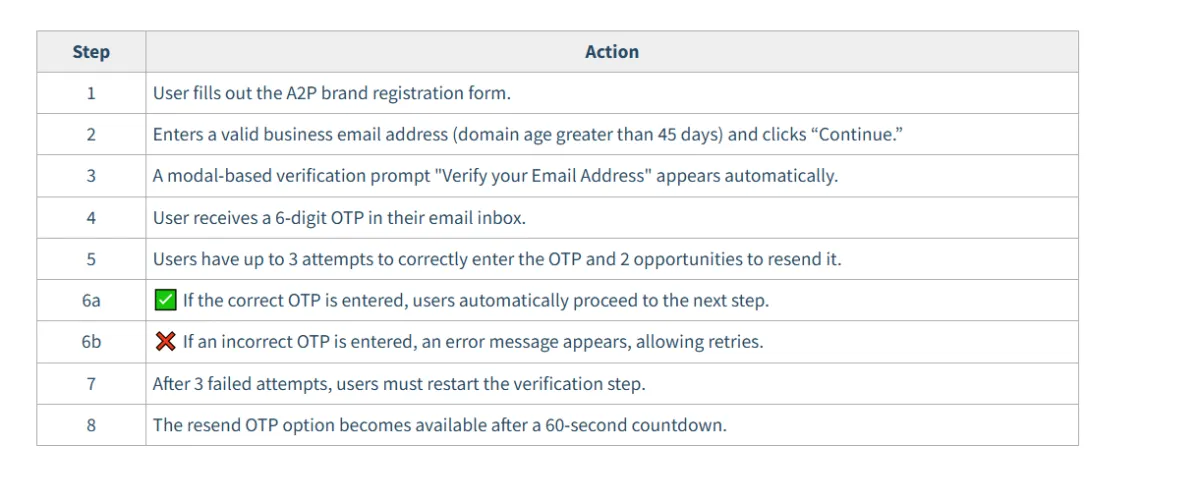
OTP Modal Interface and Attempt Configuration
The OTP modal presents:
Clearly marked six-digit input fields for accurate OTP entry.
A visible countdown timer indicating when the next OTP can be requested.
Informative error messages indicating remaining attempts.
Transparent integration into the HighLevel registration sequence.
How To Set Up Email OTP Verification for A2P Brand Registration
To set up and test Email OTP Verification, follow these steps:
i. Enter your desired email address in the Contact Info section while submitting the A2P Brand Registration. (Refer to the A2P Standard Brand Registration for 10DLC article to know more about the Brand Registration process.)
ii. A 6-digit OTP verification prompt appears automatically.
iii. Check your email inbox, spam, or junk folder for the OTP and enter the OTP in the provided modal fields.
iv. If needed, use the “Resend OTP” option after a 60-second cooldown, with a maximum of two resends.
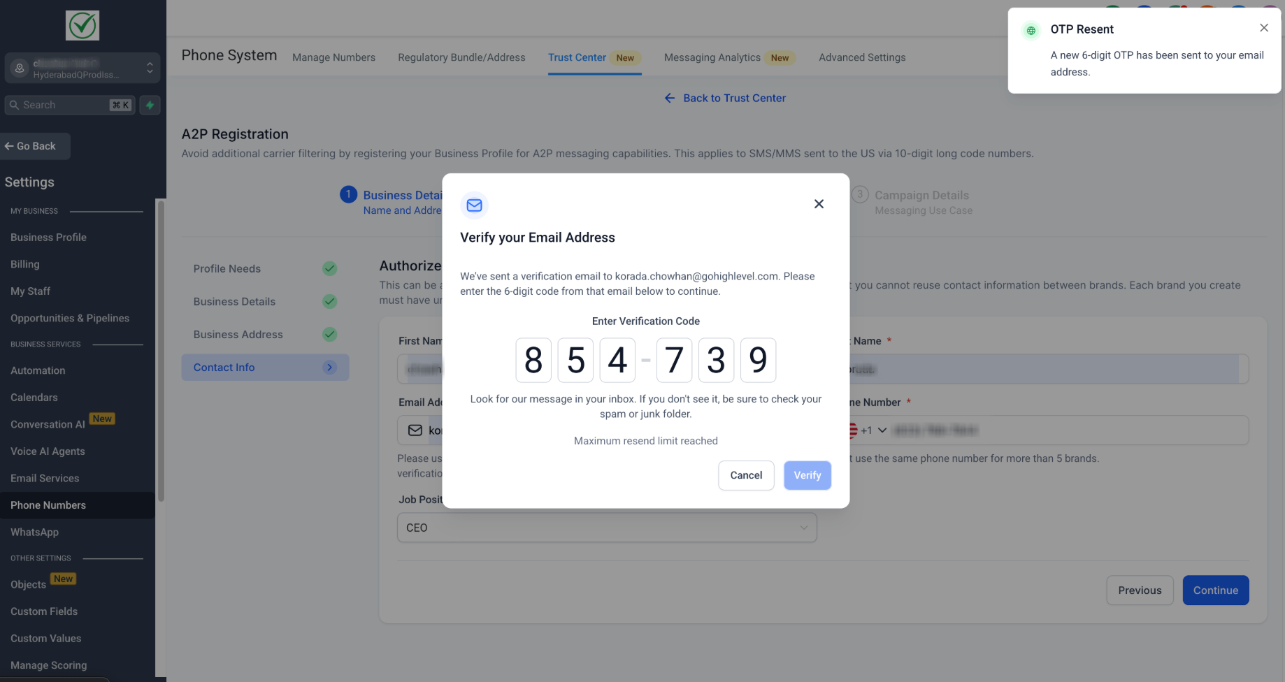
Please Note - Upon successful verification, the registration flow proceeds. If verification fails, follow on-screen instructions or if you're experiencing issues or have questions about the A2P registration process, contact our support team via chat or email.
Didn’t Receive the OTP?
Double-check the entered email for typos.
Check spam or junk folders.
Wait for the 60-second timer and use the "Resend OTP" option.
Frequently Asked Questions
Q: What determines if my registration requires OTP verification?
OTP verification is triggered for business emails with a domain age greater than 45 days that do not undergo Persona verification.
Q: How many attempts do I have to enter the OTP?
Three attempts are allowed, with up to two OTP resends.
Q: What is the time delay between OTP resends?
A 60-second countdown timer.
Q: What happens if I repeatedly fail OTP verification?
After three failed attempts, you must restart the verification process.
Q: Why is Email OTP Verification important for A2P registration?
It ensures verified email ownership, reducing phishing and brand impersonation risks.